

Protect valuable product URLs by inventorying them before an ecommerce redesign, keeping relevant addresses where you can and permanently redirecting changed ones to equivalent pages. Test the buying journey separately from the migration work. A store can preserve search landing pages and still lose orders if shipping, stock or checkout behaves differently on the redesigned site.

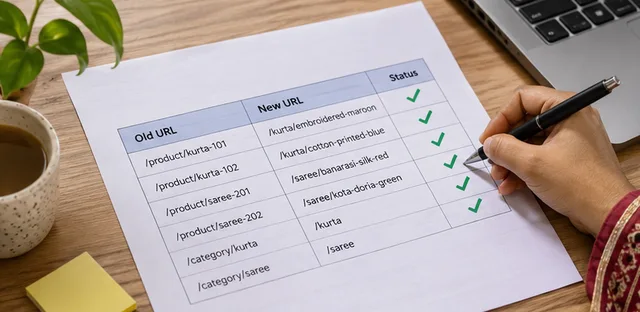


Build an inventory of existing URLs
Start with evidence of which pages matter
Export product, category and landing page URLs from your store and sitemap. Add pages found in search and analytics reports, campaign records or backlink data. Capture the final status, canonical URL, page type and what a visitor should find there. Prioritise pages with orders, search clicks or useful links, including older product lines that may still send qualified traffic.
Take a baseline for organic traffic, completed checkouts and common errors using a comparable period. Save reports separately from the project workspace so they remain available if the platform changes. Document the dates and events that can distort comparisons, such as a large promotion or stockout.
Include variants, filters and campaign paths
Decide how the target platform represents colours and sizes, and whether variant links lead to the same canonical product page. Identify internal search, listing filters and sorting parameters that do not belong in a migration sitemap. Inventory meaningful campaign pages separately. A landing page named after an old offer may still be linked from an email or local listing long after the campaign ended.
Map changed URLs to equivalent destinations
Keep addresses where the product and page purpose are the same
Preserve stable product and category URLs whenever your platform permits it. Use a permanent redirect when an address genuinely needs to change. For each old address, choose the page serving the closest legitimate user need. For example, if a product’s slug changes while the item remains available, redirect to the new version of that product. If it is retired without an equivalent, decide whether an honest unavailable or removed page makes more sense than an unrelated redirect.
Build the mapping in a spreadsheet with the old address, planned destination, reason, implementation status and test result. Note which version of the old site you exported. Where appropriate, include language variants and important query strings. Do not automatically redirect entire categories of missing products to the homepage, because shoppers following a specific link may be unable to find what they expected.
- Test priority redirects directly, including any old slug that already redirected before the redesign.
- Check for loops and chains, and point directly to the final relevant destination.
- Update internal links, navigational entries and campaign destination URLs.
- Use final canonical URLs in the XML sitemap.
- Review responses for removed products as well as changed addresses.
Preserve what search engines and shoppers need to see
Check that the redesigned product page displays its main information without relying on a buyer taking an unnecessary action. Verify title, description, main heading, relevant content, structured data and canonical URL. Ensure staging settings do not follow the site to production. Check public pages for unintended noindex directives and keep private routes restricted according to your deployment plan.
Generate the new sitemap from indexable destinations. Compare the planned URL set with the exported old sitemap and account for removed, replaced and unchanged pages. Test internal navigation so category and related-product links point to final addresses. Review real mobile pages for price, availability, delivery eligibility and a visible buying action.
Test checkout as a separate launch requirement
Use real purchase scenarios
Place a test order from a popular product page and another from a migrated landing page. Include guest and returning shoppers, a coupon, taxed shipping where relevant and out-of-stock behaviour. Confirm the displayed price and delivery charge match the order record. Test the payment outcome, order email and any stock or courier integration.
Use Indian delivery and payment scenarios that apply to your store. Try a serviceable PIN code and one the business cannot fulfil, then try UPI or another supported method on a mobile phone. Validate a refund or cancellation with finance. Compare what changes in the platform and gateway so staff know where to look when a shopper reports a problem.
Keep customer and order data in view
Check how accounts, saved addresses and prior orders transfer. If shoppers need to reactivate their accounts, prepare a clear message and support path. Agree how you will capture orders and stock changes made after an initial export and before the new site begins taking orders. Keep the reconciliation owner and timeline in the launch checklist.
Rehearse launch and monitor after release
Pick a launch window and name an owner for redirects, checkout, inventory and customer support. Keep a verified backup and agree what might require a rollback. A backup alone does not tell you how to handle an order placed after the last copy, so record the recovery procedure and who approves it. Use a short test run on production after release where appropriate.
- Verify a sample of priority legacy URLs and their final pages.
- Submit the updated sitemap and inspect representative pages in Search Console.
- Monitor 404s, organic landing pages and mobile checkout completion.
- Investigate missing stock, invalid prices and payment mismatches quickly.
- Keep the redirect map so future catalogue changes do not recreate old problems.
For example, a furniture store might preserve its top collection URLs but change a handful of variant links while moving to a new theme. Test those variant links from search and emails, then test buying a courier item and requesting a quote for a large item. Use the results to decide whether both customer paths are ready for launch.
Check a launch from outside your organisation
Test the new site in a clean browser session and on a real mobile connection. Follow a link from an older campaign or buyer email, inspect the resulting page and complete a permitted purchase test. Include a colleague who had no part in development and ask them to find shipping, returns and customer support information. Internal testers who know the old and new site can unconsciously compensate for confusing navigation. Record which links they used and whether a shopper would see any broken page or misleading redirect.
Also test how the redesigned store behaves when a category has no available products. An empty listing should explain the next action and retain a sensible page response if the products are expected to return.